HPCS - 606.325.9990

  • Home
  • About
    • Directions
  • Blog
  • Services
  • Pay Invoice
  • Remote Access
  • Support
    • Email Domain Scanner

2023 Trends in Data Privacy That Could Impact Your Compliance

February 15, 2023 by Nathan Parks

Data privacy has been a growing requirement ever since the internet age began. So much personal information is flying around through computer networks. Protecting it has become a mandate.

Most companies must follow HIPAA, GDPR, or another industry or locality-based privacy rule. By the end of 2024, 75% of the world’s population will have their personal data protected. It will fall under one or more privacy regulations.

You don’t need to be a large enterprise organization to have data privacy compliance at the top of your mind. It goes hand in hand with cybersecurity. Additionally, privacy requirements hit all sized companies.

Between July 2020 and July 2021, GDPR violations rose by 113.5%. The number of associated fines also jumped, by 124.92%. When it comes to HIPAA violations, each incident can carry a penalty between $100 to $25,000.

It’s important to make data privacy a priority and factor it into all your data collection processes. When companies collect, send, or store personally identifiable information (PII) it needs protection. This means putting adequate safeguards in place.

To stay on top of your privacy compliance obligations, you should also keep up with trends in this area. Next up, we’ve documented the biggest data privacy trends happening in 2023 that you should be aware of.

Free illustrations of Security

What’s Happening in Data Privacy Compliance?


AI Governance

Approximately 40% of privacy compliance technology needs artificial intelligence (AI) to operate. AI has certainly made its way into many of the applications we use on a daily basis.

When you’re typing in MS Word and text just springs up as a suggestion, that’s AI predicting what you’ll type next. When working on a photograph in Photoshop, you can now click a button to give a frowning face a smile. This is also the work of AI.

So, it’s no surprise that AI is running many of the algorithms responsible for keeping data protected. But what happens when there is a problem with the AI?

This is the question that AI governance is working to address. This is a new trend in data privacy because AI has never been so prevalent throughout the data journey as it is now.

Whenever AI is used in the data protection area, organizations need to govern it properly. This helps ensure that automated processes aren’t accidentally exposing sensitive data.

Consumer Privacy UX

A trend that we’ve seen over the last several months is putting more privacy power into the consumer’s hands. Many privacy regulations require that apps and websites provide data transparency. They need to tell people what data they’re collecting, how they’re collecting it, and what they do with it. People also need an “out” to get their data back.

These needs have led to consumer privacy UX becoming a “thing.” You can think of this as a centralized privacy portal. A place people can access privacy-related settings in various apps. This gives better visibility into how their data is being used.

Increased Scrutiny of Remote Employee Monitoring

The pandemic has forever changed the global workforce. Many organizations are now running completely remote offices. Or may be using a mix of remote and in-office staff. The dramatic increase in people working from home has led to data collection changes. Companies are ramping up their monitoring of those employees working off-site.

But this type of monitoring opens a can of worms when it comes to data privacy. Organizations need to ensure that they aren’t encroaching on the rights of their staff. This is most pertinent when putting monitoring in place on employee devices.

For example, approximately 49% of remote employees use their personal computers for work. Companies often put endpoint device monitoring in place for security reasons. They need to ensure they are not gathering or backing up any personal data. That would be data owned by the employee and not the company.

Data Localization

One of the concerns when the social app TikTok became popular relates to location. With the firm being a China-based company, people worried about the privacy of their data. The data was originally stored on servers governed by the Chinese government. A country with very different data privacy rules than the US and other countries.

Data localization is going to become more prevalent. Increasingly organizations look at where their cloud data is being stored. Where a server resides governs the privacy rules and regulations that it may fall under. Thus, companies and governments are now asking a question of cloud providers. This is, “Where is my data stored?” Many want their data to be as close to home as possible.

Privacy-Enhancing Computation (PEC)

Data privacy by design is a fairly new term. Using privacy-enhancing computation is a way that AI is helping cybersecurity. By using PEC as a built-in component of software and apps, developers provide value to clients. They address privacy concerns by making data protection more automated.

Look for PEC components in data analytics when shopping for business tools.

When Is the Last Time You Had a Compliance Check?

How are your data privacy protections? Are you risking a penalty due to lax controls? Give us a call! We can help with a compliance checkup.


—
Featured Image Credit

This Article has been Republished with Permission from The Technology Press.
Filed Under: Cybersecurity

8 Tech Checks to Make Before You Travel

February 10, 2023 by Nathan Parks

Our technology inevitably comes with us when we travel. Most of us won’t even travel to the end of the block without our smartphones. When you go on a trip, not having your technology there when you need it can ruin your day.

Travel smarter and more securely by doing several checks before you go. Use our handy tech travel checklist. It can save you from suffering from lost devices, missing chargers, or a data breach.

MacBook Pro, white ceramic mug,and black smartphone on table

1. Check Your Apps

Have you ever sat at an airport gate wondering why it looked so empty? You then found out that your gate had changed, and you had no idea. You go rushing to the other end of the concourse, hoping you’re not too late.

How did everyone else know about the gate change? They most likely had the app for the airline and received a notification.

Before you leave for a trip, make sure to download any apps you may need. It’s better to download them when you’re at home on your own Wi-Fi. If you wait until you’re at the airport, reception may be an issue.

Some of the apps you may want to grab or update before your trip are:

  • Airline app
  • Train app
  • Hotel app
  • Theme park app
  • Camping ground app
  • Weather app
  • City tourism app

2. Check Your Cords & Adapters

People leave behind countless chargers and adapters every day. They litter airports, restaurants, and train stations around the world. Make sure to bring a backup charger for your laptop, tablet, or phone. Otherwise, you may find yourself paying a premium for a new charger in a gift shop. Your device could also go black if you lose its charger and can’t quickly get a new one.

3. Check Your Power

A great way to ensure you have the power you need is to buy a small charging battery. You can find these in most major retailers or online. They are small “blocks” that hold a charge and can power up a cell phone in a pinch.

Having this extra backup also helps you avoid potential juice-jacking ports. These are fake or compromised public USB charging ports. Hackers use them to steal your data when you plug in.

4. Check Your Mobile Plan

If you’re traveling out of the country, you’ll want to check your mobile plan. If you don’t have the ability to call internationally, then you may not be able to text or call home.

Carriers can add an international capability to your plan, but ask about pricing. It can get expensive if you’re on long calls or using mobile data. An alternative is to set up a VoIP app you can use with your office, friends, or family while you’re traveling. These enable both calls and SMS, but you do need an internet connection.

5. Check or Add a VPN

Free Wi-Fi may be a welcome site when you’re on the road, but it can also be dangerous. You don’t know who else is using that Wi-Fi. A hacker hanging out on the connection can easily steal your data if you’re not protected.

It’s better to use either your mobile carrier connection or a virtual private network (VPN) app. VPN plans are inexpensive and will keep your data encrypted, even if you’re on public Wi-Fi.

6. Check Your Backup

Unfortunately, mishaps occur when traveling. You may leave your phone behind on a boat, have your luggage lost, or get your device stolen while in a crowded area.

10% of all laptop thefts happen in airports.

Don’t lose all your data with the device! Back up your devices to the cloud or local storage before you travel. This ensures that you won’t lose the valuable information on your device. You also won’t need to think twice about enacting a remote “wipe my device” command if necessary.

7. Check Your Device Security

Make your devices as secure as possible before you hit the road. When we’re traveling, our minds are occupied by other things. So, you may not think to check your antivirus or avoid suspicious phishing links.

Protect your devices before you go using:

  • Antivirus/anti-malware
  • DNS filtering
  • Screen lock with passcode
  • Sharing features turned off
  • VPN application
  • Find-My-Device feature turned on

8. Check Your Double-Checks

What do we mean by checking your double-checks? Use the buddy system as a backup. When the family is getting off a plane, each should check with the other that they have all their devices.

If you’re traveling alone, have a friend or family member check up by text. Did you grab your charger? Is your VPN turned on?

Those little reminders can go a long way toward avoiding digital travel nightmares.

Improve the Security of Your Devices Now

Don’t leave your devices unprotected. This could mean a breach of your banking app or personal data. Contact us for device security solutions to reduce your risk.


—
Featured Image Credit

This Article has been Republished with Permission from The Technology Press.
Filed Under: Cybersecurity, IT Management

7 Most Exciting App Announcements at Microsoft Ignite 2022

February 8, 2023 by Nathan Parks

If you follow Microsoft products, then you may know about Microsoft Ignite. Held annually, it generates many exciting updates and announcements in the Microsoft world.

Microsoft held its most recent conference last October. In the rush of the recent holidays, you may have missed some of the highlights. So, we’re bringing them to you now.

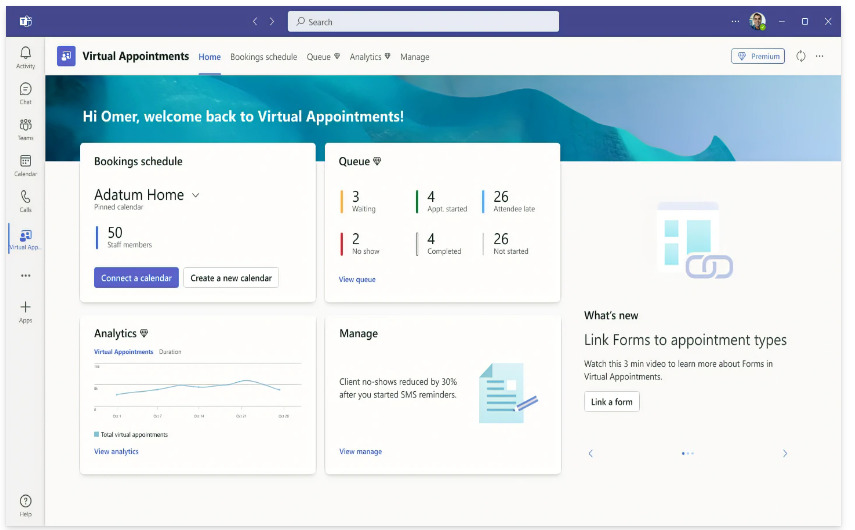
One thing you’ll notice is that Microsoft Teams got a lot of love at the event. Microsoft is now describing Teams as “the app at the center of Microsoft 365.” We can see why the company keeps enhancing this virtual workspace. Teams now has over 280 million users. It’s not surprising seeing that Microsoft has introduced over 450 new Teams features. And that’s just in the last year.

We’ll go over some Teams features below, along with other Microsoft App announcements from Ignite. These may give you some ideas for your next digital workflow upgrade.

Teams Premium

There is a new Teams Premium offering from Microsoft that adds a whole new AI component to the platform. This service includes several AI-powered features. They make it seem like you have your own meeting assistant.

Some of the cool features include automatically generating chapters from a Teams meeting. The app also generates personalized highlights for you. This saves you from having to rewatch the meeting later.

If you’re meeting internationally, you can enjoy real-time translations for captions. Meeting guides is another new feature. It sets up your meeting options according to your needs.

360-Degree Intelligent Camera for Teams Meetings

SmartVision 60 is the first 360-degree, center-of-room intelligent camera. It has the ability to track the speaker as they’re moving. The camera is also due to have a people recognition feature coming soon.

Virtual meetings can feel much more like real meetings using SmartVision 60. Instead of just seeing a small video feed of one person, the movement of the camera can capture a whole team.

Cisco is Now a Certified Devices Partner for Teams Rooms

Those that are fans of Cisco meeting products will be pleased to know they now have more options. Microsoft announced that Cisco is now a Teams Room Certified Devices partner. You can now start Teams meetings across all certified Cisco meeting devices.

Microsoft Places

One of the virtual workspace apps to support the new hybrid movement is Microsoft Places. This is a team management app that integrates with the rest of the Microsoft 365 ecosystem.

The office is still around, but for how long? Much of the world had to do things virtually during the pandemic. Many companies and employees found they like it better that way. Seventy-four percent of US companies have or plan to put in place a permanent hybrid work model.

Microsoft Places is one more way Microsoft is leading the hybrid office revolution. Some of the app’s features include:

  • Manage and track where employees are working (at home or in the office)
  • Track whether coworkers are away or available
  • Track physical room use to make strategic decisions

Hours & Location Feature in Outlook & Teams

Another feature announcement related to the hybrid working world is hours and location. This is a new capability added to Teams and Outlook to make it easier to schedule in-person meetings.

It can get tricky to plan in-person meetings when you don’t know who is working at the office and who is remote. If you plan without checking, you’re bound to alienate someone. They won’t be happy if they were planning to work from home that day.

The new hours and location feature allows people to specify where they are working. They can adjust this from hour to hour. It takes the guesswork out of scheduling.

Loop App Private Preview

Another exciting app announcement that Microsoft made was about its Loop app. It stated that Loop entered private preview. This gives some organizations a chance to check it out.

Loop is a collaborative workspace app that helps teams ideate in a virtual space. All data pulled in from Microsoft 365 apps syncs automatically to stay up to date.

Microsoft Clipchamp Video Editor

You may have noticed an unfamiliar app popping up on Windows. Microsoft Clipchamp was formally announced at the Ignite event. It’s a quick and easy video editor for Windows PCs.

Have you ever felt frustrated trying to fix a video and not having the right tool to do it? Then you may want to take a closer look at what Clipchamp has to offer. It looks to have a fairly low learning curve.

Get Help Navigating the Microsoft 365 Universe

Microsoft 365 has come a long way in a short period. There are many different app integrations you can use to power your workflow. But it can get a bit complicated without an expert to help. Give us a call today to schedule a Microsoft consultation.


Article used with permission from The Technology Press.

Filed Under: Microsoft, New Technology

Windows 7 Users Getting End-of-Support Notices Next Month

April 11, 2019 by Nathan Parks Leave a Comment

Windows 7 and Server 2008 R2 support is coming to an end soon. After January 14th 2020 you will no longer receive updates! Contact us for more information.

“Microsoft plans to issue regular notices starting next month that will inform Windows 7 Service Pack 1 (SP1) users that the operating system will reach its end-of-support phase on Jan. 14, 2020.”

https://redmondmag.com/articles/2019/03/13/windows-7-support-notices.aspx

Filed Under: Cybersecurity

Wired: FAX MACHINES ARE STILL EVERYWHERE, AND WILDLY INSECURE

August 31, 2018 by Nathan Parks Leave a Comment

If your business still utilizes fax contact us to secure your network!

IT’S TEMPTING TO think of fax machines as a relic, every bit as relevant as an eight-track tape. But fields like health care and government still rely on faxes every day. Even your all-in-one printer probably has a fax component. And new research shows that vulnerabilities in that very old tech could expose entire corporate networks to attack. <Read More…>

Filed Under: News

WPA2 Flaw Leaves Traffic Open to Eavesdropping

October 16, 2017 by Nathan Parks Leave a Comment

Alert: Update your wireless devices as soon as possible and make sure the update includes the patch for the new KRACK WPA2 vulnerability. For customers on our Unifi Cloud Controller plan these updates are in place and you have nothing to worry about. For all other customers we will be in touch about updating your equipment manually.

For more information:
Severe flaw in WPA2 protocol leaves Wi-Fi traffic open to eavesdropping
Severe WiFi security flaw puts millions of devices at risk
WPA2 security flaw puts almost every Wi-Fi device at risk of hijack, eavesdropping

Filed Under: News, Tech Tips

Ransomware Continues to Target Small to Medium Sized Businesses

July 27, 2017 by Nathan Parks Leave a Comment

Ransomware infections continue to rise.  Click on the info-graphic above for more information and contact us to get your business or personal computers protected!

Filed Under: Tech Tips

More Bandwidth Coming to Ashland Soon!

January 5, 2015 by Nathan Parks Leave a Comment

It was announced last week that 3000 miles of new fiber is being laid in Kentucky and below is a map and schedule of the install. This will lead to increased internet speed, lower latency, a drop in cost per Mbit, and increased cell phone coverage.  Ashland’s part could be completed in just a little over a year, very exciting news! Check out the map and announcement video below.

statewide_fiber_layout_map-3


Read more here and here.

Filed Under: News, Tech Tips

  • « Previous Page
  • 1
  • …
  • 16
  • 17
  • 18

Reviews

High Performance Computer place picture
High Performance Computer
4.5
Based on 26 reviews
powered by Google
review us on
Mary Ann Travis profile picture
Mary Ann Travis
5 years ago
Local and honest
Curtis Bradley profile picture
Curtis Bradley
6 years ago
Nathan & Joe solved our computer related problem quickly and we were able to submit our application to PNC Bank for the Payroll Protection Program.
CJ profile picture
CJ
7 years ago
I have used HPC's services several times, always with the same result ………………… they fix my problem in a timely manner at a reasonable cost. They are also extremely friendly, and even stayed after closing a few minutes in order for me to get there and pick up my computer.
Great place to do business !!!
paula fletcher profile picture
paula fletcher
7 years ago
The staff at High Performance Computer Services has taken of the IT issues in our office for many years. They are friendly, competent, helpful, and knowledgeable. I have never had to wait for a problem to be addressed. Nathan and his staff are available when I call and diligent in resolving issues. I highly recommend them!
Richard Miranda profile picture
Richard Miranda
7 years ago
Needed help with my Computer and they took care of my problem. Great to work with.
Harry Wiley profile picture
Harry Wiley
7 years ago
Quick, excellent service! The company's representative who came to our home to fix our problem was professional, courteous and an excellent representative of the company.
Jay Kemm profile picture
Jay Kemm
7 years ago
They checked a computer I had and told me the problem. Fair price. Not shady. Will use again if I have issues.
More reviews

Contact Info

Toll Free – 844.300.9990
Ashland, KY – 606.325.9990
Ironton, OH – 740.414.4419
Huntington, WV – 304.521.1579
Fax – 606.393.6114

Business Hours:
9am-5pm Monday through Friday
Closed Holidays

824 Greenup Ave.
PO Box 2112
Ashland, KY 41101
support@HighPCS.com

Call Us
Toll Free – 844.300.9990

Ashland, KY – 606.325.9990

Ironton, OH – 740.414.4419

Huntington, WV – 304.521.1579

Fax – 606.393.6114

Business Hours

Phone Support – 8am-5pm Monday through Friday 
Shop Hours – 9am-5pm Monday through Friday 

* Closed for Company Meeting
Wednesday Afternoon 12-1 – Please Call *
 
Emergency Services Available
support@HighPCS.com


Directions

824 Greenup Ave.
PO Box 2112
Ashland, KY 41101

NinjaCopyright © 2026 · Agency Pro Theme on Genesis Framework · WordPress · Log in