HPCS - 606.325.9990

  • Home
  • About
    • Directions
  • Blog
  • Services
  • Pay Invoice
  • Remote Access
  • Support
    • Email Domain Scanner

9 Smart Ways for Small Businesses to Incorporate Generative AI

December 10, 2023 by Nathan Parks

There is no escaping the relentless march of AI. Software companies are rapidly incorporating it into many business tools. This includes tools like Microsoft 365, Salesforce, and others.

Many people are still concerned about where AI will go. But there is no denying that it makes certain work more efficient. It can generate custom images on demand. Or write a company device policy draft in seconds.

Staying ahead of the curve often means embracing cutting-edge technologies. Even if you’re a little wary about what the future holds.

Generative Artificial Intelligence (GenAI) is unique from the AI of a few years back. It can create, innovate, and optimize. These functions have become a game-changer for businesses of all sizes.

Leveraging Generative AI, small businesses can unlock a world of possibilities. This includes everything from enhancing customer experiences to streamlining operations.

Have you felt bombarded with AI tool options? Unsure where to begin with leveraging it for your business? Let’s explore some smart and practical ways to incorporate GenAI.

1. Personalized Customer Experiences

Generative AI algorithms can analyze customer data and preferences. Using these, it can create personalized experiences.

48% of customers expect specialized treatment for being loyal to a company.

Some of the ways AI can help you improve customer experience include:

  • Tailored product recommendations
  • Customized marketing messages
  • Custom coupons
  • Proactive engagement

These things help small businesses enhance customer satisfaction, fostering brand loyalty.

2. Presentations & Graphics Creation

Generating a great sales presentation can be time-consuming. AI tools can automate this process. Microsoft Copilot is one of these. It can take meeting notes and prompts and create a presentation. Including images!

Have you ever had trouble finding a promotional image? Tell Bing’s new AI tool what you need. You’ll get several options, tailored to your description.
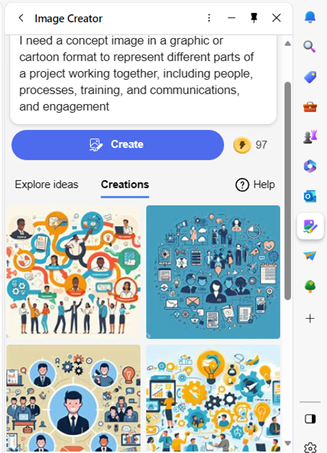
Bing-AI
Example from Bing powered by DALL-E3 in Edge

AI-driven platforms can produce relevant and engaging graphics. This frees up valuable time and saves money for business owners.

3. Chatbots for Customer Support

AI-powered chatbots on websites and social media platforms are becoming commonplace. This is because they enable small businesses to provide instant customer support. Which is exactly what people expect these days.

These chatbots can handle frequently asked questions. They can also assist with product inquiries and customer transactions.

They help small companies provide round-the-clock help for customers. But without having to pay for extra staff hours.

4. Data Analysis and Insights

Generative AI can process vast datasets to extract meaningful insights. Small businesses can use AI algorithms to analyze important data.

Such as:

  • Market trends
  • Customer behavior
  • Operational data

These insights can inform strategic decision-making. Which helps businesses refine their offerings and marketing strategies.

5. Product Design and Prototyping

AI in product design process allows businesses to explore many design variations rapidly. AI algorithms can generate prototypes and simulations. They do this based on specified parameters. This enables small businesses to visualize products before investing in physical prototypes.

6. Supply Chain Optimization

AI can optimize supply chain operations. It can predict demand, identify inefficiencies, and suggest inventory levels. It takes away the human error component. As well as fees up teams from tedious administrative work.

Small businesses can reduce costs and improve efficiency. AI automates a lot of the supply process. This helps ensure products are readily available when customers need them.

7. Dynamic Pricing Strategies

AI-driven pricing algorithms can help companies make better pricing decisions. Pricing your products and services can be tricky. You don’t want to go too low or too high.

AI helps businesses quickly analyze:

  • Market trends
  • Competitor pricing
  • Customer behavior

These data insights help companies optimize pricing strategies. Small businesses can also dynamically adjust prices based on demand. This maximizes profits while remaining competitive in the market.

8. Human Resources and Recruitment

Generative AI can streamline the recruitment process. The hiring process includes a lot of work reviewing resumes. Many candidates don’t make the interview stage.

AI can help by analyzing resumes and screening candidates for you. It can even help with conducting initial interviews. Small businesses can find the best talent to drive their growth faster.

9. Predictive Maintenance

Downtime on a production line is costly. Proactive maintenance is vital. It’s another area where Generative AI can help.

The technology can predict maintenance needs based on data analysis. It helps businesses avoid costly downtimes. It proactively addresses maintenance requirements. As well as helps to ensure smooth operations.

Unsure How to Get Started with AI at Your Business?

Generative AI opens a world of opportunities for small businesses. It can also add to the complexity of a technology infrastructure.

We can help you use it effectively and affordably. Give us a call today to schedule a chat.

—
Featured Image Credit

This Article has been Republished with Permission from The Technology Press.

Filed Under: New Technology

What Should You Expect in the New iOS 17?

September 30, 2023 by Nathan Parks

Apple’s iOS updates have always been eagerly anticipated. iPhone and iPad users around the world get excited to see what their devices can do next. The newest major upcoming release will be for iOS 17. This fall, Apple is set to introduce a host of exciting new features and improvements.

iOS 17 promises to deliver an even more intuitive and seamless user experience. There will also be big changes for Messages and sharing across phones.

In this article, we’ll take a closer look at some of the key features you can expect. Get ready to explore the latest innovations that Apple has in store for its users.

Get an Instant Transcript of Voicemails

How do you know if that voicemail that came in while in a Zoom meeting is important? iOS 17 is going to make that much easier to determine. When you get a voicemail, you’ll see a transcript of the message on your screen. No more guesswork!

Voicemail Transcript
Image credit: Apple

Personalized Contact Posters

Do you hate the picture that someone has saved of you in your contact? The one that comes up every time you call them? You’ll now have power over how you look when you call others.

Apple is introducing personalized Contact Posters. You can customize how you’ll look when calling people with whom you’ve shared your poster. You can appear as your photo, a Memoji, and more. You can also add text and colors.

Leave a Video or Audio FaceTime Message

You have better options when calling someone on FaceTime and they’re not there. Instead of just leaving a missed call. FaceTime will support audio and video messages. These are like enhanced voicemails.

Now, if you want to share an exciting visual in the moment, you can. Even if the person doesn’t pick up. You can leave it for them to watch later.

More FaceTime Enhancements – Reactions & Apple TV

Another cool enhancement coming to FaceTime are more expressive reactions. Some of the new ways to express yourself include:

  • Hearts
  • Balloons
  • Fireworks
  • Laser beams
  • Rain
  • and more

Also, a FaceTime call can now connect with AppleTV. See loved ones right from your large-screen television, as big as ever.

Stickers, Anyone?

If you’re a fan of stickers in messages, you’re going to love this next feature. Messages will be getting a big sticker enhancement in iOS 17. This includes new emoji stickers. You’ll also have the ability to create Live Stickers from subjects in photos.

You can also liven stickers up with effects. A sticker drawer is also going to be available to store them all neatly.

AirDrop & NameDrop for Easier Sharing

Sharing photos, videos, and files across devices will get better. In just seconds, you can use AirDrop to share files from one phone to another.
NameDrop gives you a quick way to share contact details. All you need to do is bring two iPhones together. It also works with an iPhone and Apple Watch. Oh, and music is included in the sharing fun!

NameDrop is also how you’ll share that cool Contact Poster you made.

Smarter Autocorrect & Dictation

Who hasn’t cursed an autocorrect choice that makes you look bad? Apple feels your pain and is introducing smarter autocorrection. This feature will get a machine learning language model upgrade. The update will help it predict text better to learn what you really meant to type.

Dictation is also getting an upgrade. It will use a new speech recognition model to improve its accuracy.

StandBy Glanceable Screen Mode

Apple wants your iPhone to be even more useful. Even when it’s charging across the room. So, iOS 17 introduces StandBy. This gives users a full-screen experience with information shown big on the screen.

You can personalize the display with a full range of helpful views:

  • Clock styles
  • Favorite photos
  • Widgets (including Smart Stacks)
  • Live Activities
  • Siri
  • Incoming Calls
Standby
Image credit: Apple

New Mental Health Features in the Health App

Apple is introducing more mental health features. The health app will enable users to log daily moods and momentary emotions. The goal is to help people see what contributes to their state of mind. As well as easily access depression and anxiety assessments used in clinics.

Screen Distance in Screen Time will also assist with digital eyestrain. It will encourage a user to move their device farther away from their face. It will do this if users have held their phone closer than 12 inches over a certain period of time.

Get Help with Smartphone Tutoring, Security & More

iOS 17 is shaping up to be an exciting update for Apple users. It offers a range of new features and enhancements. Even more than we could fit into this article.

If you’re looking for help learning how to use your phone’s features or enhancing security, give us a call. We can improve your experience with one of the most important pieces of tech people use today. Their smartphone.

Give us a call, and let’s chat.

—
Featured Image Credit

This Article has been Republished with Permission from The Technology Press.

Filed Under: New Technology

7 Customer-Facing Technologies to Give You an Advantage

May 10, 2023 by Nathan Parks

Customers look for convenience. In today’s world that means technology that makes their life easier. From webforms to POS systems, you need to keep the customer experience in mind in all you do.

When people aren’t happy with their experience interacting with a company, they leave. And their experience might not have anything to do with your products or services. Maybe they found it hard to navigate your website. They may have a question, but no one was around to answer it.

Customers expect you to make it easy for them to do business with you. Companies that do that, reap the benefits. Customer-centric companies are 60% more profitable than those that aren’t.

Technology is key to converting website visitors into clients. It’s also key for keeping customers happy and returning to buy again.

Where should you focus? Below are several ideas for all business budgets.

Cloud Forms

Are you still emailing forms in Microsoft Word to your customers? Using cloud-based forms makes the experience much better. Your customer doesn’t need to save a form to their computer and remember to email it back. Instead, they can follow a link and fill out the info online from any device.

Moving your forms to the cloud makes it easier for you as well. The form data comes in automatically. These systems also collate forms and provide analytics.

If you use Microsoft 365, then you already have a cloud form tool. Look for Microsoft Forms in your available applications or visit Microsoft’s site.

Digital Signatures

Experts expect the use of eSignatures to grow by 69% by 2024. The ability to digitally sign documents means more contracts get signed. People don’t have to print out a form, sign it, then scan it back in. Any of those activities could mean a bump in the road.

Printers run out of ink. People have trouble with a scanner they rarely use. The list goes on. Any problem can mean a customer rethinks signing a document that you need.

Using digital signatures streamlines the process. You can handle the transaction online. You also ensure you have a legally binding signature.

Smart Chatbot

When someone makes a buying decision, they often have a question. If they don’t have a quick and easy way to get an answer, they may go elsewhere.

Chatbots are really smart these days. If you program them right, they can answer a large percentage of repeat questions. They’re there 24/7 on your website ready to help in a moment of need.

Many customers actually like them. About 68% of consumers are happy using helpful chatbots. They say they like that they get a fast answer from a bot. This isn’t always the case when customers send an email.

SMS Notifications

SMS notifications are another type of technology that can improve customer experience. Emails have become flooded with junk mail. When someone needs to know about a shipment or purchase, they often prefer it by text. This way the message isn’t missed.

Think about implementing SMS notifications for important customer alerts. Make sure you have an opt-in and opt-out method. It’s also a best practice to let the customer choose which alerts they want to receive. Such as payment notifications, sales, or shipping details.

Business Mobile App

People have been in a transition from websites to apps for a while. Of course, the internet isn’t going away, but apps are gaining ground. A big reason for this is the rise of smartphone use.

Smartphone searches are overtaking web searches. And when people are on a mobile device they prefer apps over websites. Studies show that mobile users spend 90% of their time using apps, and just 10% using an internet browser.

Think about implementing a mobile app for your business. This can make it easier for customers to do business with you. It also gives you more marketing and service capabilities, such as push notifications.

If you’re on a tight budget, you could start with a “wrapper” app. These are solutions that take your existing website and transform it into an app.

FAQ Kiosk

For retail stores, having an FAQ kiosk available can provide a positive experience. It can allow customers to get questions answered quickly. It could also help them look up sales and coupons.

Service businesses can also benefit by using this digital tool. They can use it for commonly asked questions. They can also use it to direct clients to staff offices.

VoIP Phone System

You might think of your phone system as an internal piece of IT. But it’s also one of your most customer-facing technologies. The experience people get when they call is a vital part of how they view your business.

VoIP phone systems give staff the flexibility to help customers anywhere. This is true even when away from their desks. They also enable things like group ring, auto-attendant, and voicemail to email. All these features make for better caller interaction with your business.

Get Help Planning Your Technology Roadmap

Which technology upgrades will benefit your bottom line the most? How should new systems integrate into existing solutions? These are some of the things we look at when helping you look ahead to the future. Give us a call today to schedule a chat.

—
Featured Image Credit

This Article has been Republished with Permission from The Technology Press.

Filed Under: New Technology

How Is the Metaverse Going to Change Business?

February 25, 2023 by Nathan Parks

The new buzzword around town is “metaverse.” But what does that actually mean for businesses? Is it just something that social media companies need to be concerned about?

According to people like Apple’s CEO Tim Cook, the metaverse is coming. He stated that “Life without AR will soon be unthinkable.” Whether that’s a short-term or long-off prediction, companies need to be ready.

Free illustrations of Metaverse

First comes the understanding of what the metaverse is. Metaverse is a general term – hence why it’s not capitalized like a proper name. The metaverse refers to a collective upgrade of the internet to a 3D virtual environment. This would be a world interconnected between various sites. These sites would reflect the immersive games that you see today.

Did Facebook/Meta invent the metaverse? No.

The idea of connected 3D immersive worlds has been around for decades. Several online gaming companies have staked a territory in the metaverse. But their applications are less interconnected.

What’s one of the best representations of the early metaverse? It’s a short-lived software called Adobe Atmosphere. This 3D immersive experience included interconnected online worlds. It also gave people the ability to chat with others. It was a bit before its time but shows how the concept of the metaverse has been around for a while.

The metaverse is getting attention now because technology has advanced. It has begun to catch up to the needs of such a world. This includes fast internet connections and immense processing power. It also includes a delivery method for 3D that works on most PCs.

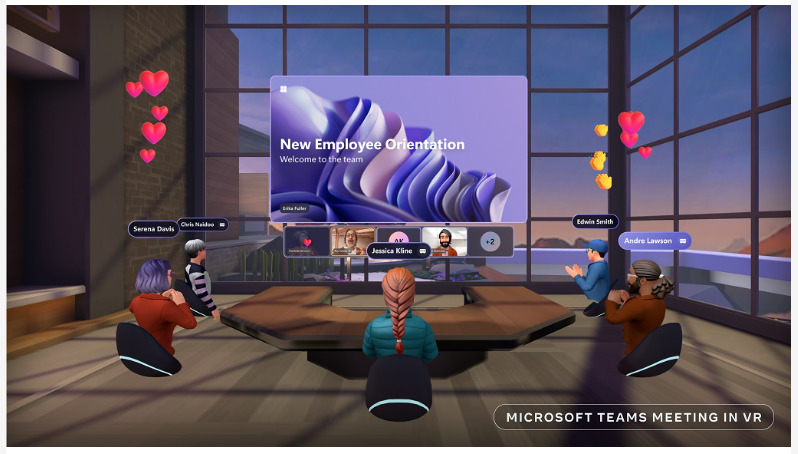
Are we there yet? Not quite. But the metaverse is picking up steam. Recently, Microsoft announced a partnership with Meta. This partnership is to bring Microsoft 365 apps into the metaverse. This means collaboration in an entirely new way. Microsoft notes that 50% of Gen Z and millennials expect to do some of their work in the metaverse in the next two years.

Microsoft Teams Meeting in VR
Image source: Microsoft

How Does the Metaverse Impact Your Company?

With companies like Microsoft looking at the future of AR/VR, it could be a reality soon. You can expect the metaverse to touch your own company in some way in the next few years. Here’s a preview of what it may impact.

Where to Advertise

When the internet was first introduced, companies didn’t immediately realize its potential. Now, most companies wouldn’t consider operating without a website. It’s a necessity for driving leads and converting sales.

If the metaverse takes off as a new 3D iteration of the internet, it could be just as important. This means exploring metaverse-type advertising in virtual worlds. Also, potentially creating your own VR site or showroom.

How to Service Customers

As the popularity of social media took off, companies realized customers used it to reach out. Seventy-nine percent of consumers expect companies to respond to a social media message. And they expect that response within a day.

To address that need, many businesses have a social media presence. They use this for marketing and to answer questions and inquiries from customers.

The metaverse may be the next step. If people begin hanging out there, they will expect to interact with businesses in that space. Just like they do now with social networks.

This means companies need to be aware of how customers may be using the metaverse as it grows. Adding a question about metaverse use to a year-end customer survey could be a way to be proactive on this topic.

Employee Training

One of the touted benefits of the metaverse is its ability to enable more immersive training. This could greatly increase training capabilities for everyone from doctors to forklift operators.

Imagine being able to replicate a task more closely in a virtual world. A person could safely make mistakes there. Then they could grow proficient before doing that thing in real life.

Start thinking about the types of training that your employees need. Then, look at ways that a VR world may make the training safer or more efficient. The metaverse may not have what you’re looking for now. But with the pace of technological advancement, it could in a year or two.

More Immersive Remote Team Collaboration

Virtual meetings skyrocketed out of necessity during the pandemic. Now, meeting by Teams or Zoom is commonplace. The next generation of online team meetings may end up being in a virtual world.

As we noted earlier, Microsoft is already working on bringing its apps into a virtual space. Add a few avatars and an immersive setting. Suddenly, you have a completely different meeting experience.

What’s one more way to enhance remote team collaboration in the metaverse? It has to do with building design and maintenance. Imagine being able to walk through a 3D recreation of a space before it’s built. Then fine-tuning the construction while inside that space.

Is Your Business Ready for the Next Digital Transformation?

What are your digital transformation plans for the next 12 months? The next three years? If you’re not sure where to begin, we can help. Contact us today to schedule a technology brainstorming session.


—
Featured Image Credit

This Article has been Republished with Permission from The Technology Press.
Filed Under: Business, New Technology

7 Most Exciting App Announcements at Microsoft Ignite 2022

February 8, 2023 by Nathan Parks

If you follow Microsoft products, then you may know about Microsoft Ignite. Held annually, it generates many exciting updates and announcements in the Microsoft world.

Microsoft held its most recent conference last October. In the rush of the recent holidays, you may have missed some of the highlights. So, we’re bringing them to you now.

One thing you’ll notice is that Microsoft Teams got a lot of love at the event. Microsoft is now describing Teams as “the app at the center of Microsoft 365.” We can see why the company keeps enhancing this virtual workspace. Teams now has over 280 million users. It’s not surprising seeing that Microsoft has introduced over 450 new Teams features. And that’s just in the last year.

We’ll go over some Teams features below, along with other Microsoft App announcements from Ignite. These may give you some ideas for your next digital workflow upgrade.

Teams Premium

There is a new Teams Premium offering from Microsoft that adds a whole new AI component to the platform. This service includes several AI-powered features. They make it seem like you have your own meeting assistant.

Some of the cool features include automatically generating chapters from a Teams meeting. The app also generates personalized highlights for you. This saves you from having to rewatch the meeting later.

If you’re meeting internationally, you can enjoy real-time translations for captions. Meeting guides is another new feature. It sets up your meeting options according to your needs.

360-Degree Intelligent Camera for Teams Meetings

SmartVision 60 is the first 360-degree, center-of-room intelligent camera. It has the ability to track the speaker as they’re moving. The camera is also due to have a people recognition feature coming soon.

Virtual meetings can feel much more like real meetings using SmartVision 60. Instead of just seeing a small video feed of one person, the movement of the camera can capture a whole team.

Cisco is Now a Certified Devices Partner for Teams Rooms

Those that are fans of Cisco meeting products will be pleased to know they now have more options. Microsoft announced that Cisco is now a Teams Room Certified Devices partner. You can now start Teams meetings across all certified Cisco meeting devices.

Microsoft Places

One of the virtual workspace apps to support the new hybrid movement is Microsoft Places. This is a team management app that integrates with the rest of the Microsoft 365 ecosystem.

The office is still around, but for how long? Much of the world had to do things virtually during the pandemic. Many companies and employees found they like it better that way. Seventy-four percent of US companies have or plan to put in place a permanent hybrid work model.

Microsoft Places is one more way Microsoft is leading the hybrid office revolution. Some of the app’s features include:

  • Manage and track where employees are working (at home or in the office)
  • Track whether coworkers are away or available
  • Track physical room use to make strategic decisions

Hours & Location Feature in Outlook & Teams

Another feature announcement related to the hybrid working world is hours and location. This is a new capability added to Teams and Outlook to make it easier to schedule in-person meetings.

It can get tricky to plan in-person meetings when you don’t know who is working at the office and who is remote. If you plan without checking, you’re bound to alienate someone. They won’t be happy if they were planning to work from home that day.

The new hours and location feature allows people to specify where they are working. They can adjust this from hour to hour. It takes the guesswork out of scheduling.

Loop App Private Preview

Another exciting app announcement that Microsoft made was about its Loop app. It stated that Loop entered private preview. This gives some organizations a chance to check it out.

Loop is a collaborative workspace app that helps teams ideate in a virtual space. All data pulled in from Microsoft 365 apps syncs automatically to stay up to date.

Microsoft Clipchamp Video Editor

You may have noticed an unfamiliar app popping up on Windows. Microsoft Clipchamp was formally announced at the Ignite event. It’s a quick and easy video editor for Windows PCs.

Have you ever felt frustrated trying to fix a video and not having the right tool to do it? Then you may want to take a closer look at what Clipchamp has to offer. It looks to have a fairly low learning curve.

Get Help Navigating the Microsoft 365 Universe

Microsoft 365 has come a long way in a short period. There are many different app integrations you can use to power your workflow. But it can get a bit complicated without an expert to help. Give us a call today to schedule a Microsoft consultation.


Article used with permission from The Technology Press.

Filed Under: Microsoft, New Technology

  • « Previous Page
  • 1
  • 2

Reviews

High Performance Computer place picture
High Performance Computer
4.5
Based on 26 reviews
powered by Google
review us on
Mary Ann Travis profile picture
Mary Ann Travis
19:18 13 Mar 21
Local and honest
Curtis Bradley profile picture
Curtis Bradley
14:27 13 May 20
Nathan & Joe solved our computer related problem quickly and we were able to submit our application to PNC Bank for the Payroll Protection Program.
CJ profile picture
CJ
16:58 11 Oct 19
I have used HPC's services several times, always with the same result ………………… they fix my problem in a timely manner at a reasonable cost. They are also extremely friendly, and even stayed after closing a few minutes in order for me to get there and pick up my computer.
Great place to do business !!!
paula fletcher profile picture
paula fletcher
19:22 02 Oct 19
The staff at High Performance Computer Services has taken of the IT issues in our office for many years. They are friendly, competent, helpful, and knowledgeable. I have never had to wait for a problem to be addressed. Nathan and his staff are available when I call and diligent in resolving issues. I highly recommend them!
Richard Miranda profile picture
Richard Miranda
16:07 10 Sep 19
Needed help with my Computer and they took care of my problem. Great to work with.
Harry Wiley profile picture
Harry Wiley
23:38 03 Sep 19
Quick, excellent service! The company's representative who came to our home to fix our problem was professional, courteous and an excellent representative of the company.
Jay Kemm profile picture
Jay Kemm
23:03 16 Jun 19
They checked a computer I had and told me the problem. Fair price. Not shady. Will use again if I have issues.
More reviews

Contact Info

Toll Free – 844.300.9990
Ashland, KY – 606.325.9990
Ironton, OH – 740.414.4419
Huntington, WV – 304.521.1579
Fax – 606.393.6114

Business Hours:
9am-5pm Monday through Friday
Closed Holidays

824 Greenup Ave.
PO Box 2112
Ashland, KY 41101
support@HighPCS.com

Call Us
Toll Free – 844.300.9990

Ashland, KY – 606.325.9990

Ironton, OH – 740.414.4419

Huntington, WV – 304.521.1579

Fax – 606.393.6114

Business Hours

Phone Support – 8am-5pm Monday through Friday 
Shop Hours – 9am-5pm Monday through Friday 

* Closed for Company Meeting
Wednesday Afternoon 12-1 – Please Call *
 
Emergency Services Available
support@HighPCS.com


Directions

824 Greenup Ave.
PO Box 2112
Ashland, KY 41101

NinjaCopyright © 2026 · Agency Pro Theme on Genesis Framework · WordPress · Log in