HPCS - 606.325.9990

  • Home
  • About
    • Directions
  • Blog
  • Services
  • Pay Invoice
  • Remote Access
  • Support
    • Email Domain Scanner

Why Continuous Monitoring is a Cybersecurity Must

July 31, 2024 by Nathan Parks

Imagine this: you leave your house for vacation. You live in a shady neighborhood but feel confident your locks are secure, but you also don’t check
them daily. Are they really locked and safe? A tiny crack or hidden weakness could have occurred. It’s a disaster waiting to happen.

That’s the risk of neglecting continuous cybersecurity monitoring. Cyber threats are constantly evolving, and traditional security measures are no longer enough. Continuous monitoring acts as your vigilant digital guard. It’s constantly checking for weaknesses. It sounds the alarm before attackers exploit them.

Why Continuous Monitoring Matters

There are several reasons you need to watch your network. It’s not just a “good to have.” Here’s why continuous monitoring is a cybersecurity must for businesses of all sizes.

Breaches Happen Fast

Cyberattacks can happen in seconds. They exploit vulnerabilities before you even know they exist. Continuous monitoring provides real-time insights. It allows you to identify and respond to threats swiftly, minimizing potential damage.

Advanced Threats Need Advanced Defenses

Hackers are constantly developing sophisticated techniques. Some can bypass traditional perimeter defenses. Continuous monitoring delves deeper. It analyzes network traffic, user behavior, and system logs. It uncovers hidden threats lurking within your network.

Compliance Requirements Often Mandate It

Many industry regulations and data privacy laws require organizations to have continuous monitoring. Failure to comply can result in hefty fines and reputational damage.

Peace of Mind and Reduced Costs

Continuous monitoring helps prevent costly breaches and downtime. It also reduces the workload for security teams. It automates routine tasks, allowing them to focus on strategic initiatives.

What Does Continuous Monitoring Look Like?

Continuous monitoring isn’t a single tool. It’s a holistic approach that combines different elements. These include:

  • Log Management: Security logs are collected and analyzed for suspicious activity. Logs come from firewalls, devices, and applications.
  • Security Information and Event Management (SIEM): SIEM systems collect security data. They tap into various sources. They provide a centralized view of your security posture and identify potential threats.
  • Vulnerability Scanning: Regular scans identify weaknesses in your systems and applications. This allows you to patch them before attackers exploit them.
  • User Activity Monitoring: Monitoring user behavior can identify suspicious activity. For example, unauthorized access attempts or data exfiltration.
  • Network Traffic Analysis: Monitoring network traffic can reveal several risks:
    • Malware
    • Suspicious communication patterns
    • Attempts to breach your network defenses

Benefits Beyond Threat Detection

Continuous monitoring offers advantages beyond just identifying threats. Here are some extra benefits.

Improved Threat Detection Accuracy

Continuous monitoring reduces false positives. It does this by analyzing vast amounts of data. This allows your security team to focus on genuine threats.

Faster Incident Response

Continuous monitoring provides real-time alerts. This enables a quicker response to security incidents, minimizing potential damage.

Enhanced Security Posture

Continuous monitoring aids in identifying vulnerabilities. It helps you rank patching and remediation efforts. This proactively strengthens your security posture.

Compliance Reporting

Continuous monitoring systems can generate reports. This helps you prove compliance with relevant regulations. It also saves you time and resources during audits.

Getting Started with Continuous Monitoring

Implementing continuous monitoring doesn’t have to be overwhelming. You can begin with a few common-sense steps.

Assess Your Needs

Identify your organization’s specific security needs and compliance requirements. Have a cybersecurity assessment done. This is the best way to identify vulnerabilities you should address.

Choose the Right Tools

Select monitoring tools that align with your needs and budget. Consider managed security service providers (MSSPs) for a comprehensive solution. We can help you ensure a holistic cybersecurity strategy. Plus, we can tailor solutions for your budget.

Develop a Monitoring Plan

Define what your monitoring plan will look like. This helps ensure that things don’t get missed. Here are some things to include in your plan:

  • How you will track data
  • How you will handle alerts
  • Who handles responding to incidents

Invest in Training

Train your security team on how to use the monitoring tools as well as how to effectively respond to security alerts. Include training on reporting from monitoring systems. Ensure your team knows how to understand the insights they offer.

Continuous Monitoring: Your Cybersecurity Lifeline

In today’s threat landscape, continuous monitoring is not a luxury. It’s a security necessity. Proactive monitoring of your systems and data has many benefits. You can identify threats early and respond swiftly, as well as reduce the impact of cyberattacks.

Don’t wait for a security breach to be your wake-up call. Embrace continuous monitoring and take control of your cybersecurity posture. An ounce of prevention is worth a pound of cure, especially in the digital world.

Need Help with Your Cybersecurity Strategy?

Monitoring is one part of a holistic approach to cybersecurity. We’ll be happy to help you protect your business. We can customize a plan that works for your needs and budget.

Contact us today to discuss your needs.

—

Featured Image Credit

This Article has been Republished with Permission from .

Filed Under: Cybersecurity

What Were the Coolest Consumer Products Showcased at CES 2024?

June 30, 2024 by Nathan Parks

The annual Consumer Electronics Show (CES) was an exciting one this year. It left us with a mind-blowing glimpse into the future of technology. CES 2024 showcased a smorgasbord of cutting-edge gadgets. Including transparent TVs and robot pet buddies. These gadgets promise to revolutionize our homes and the way we interact with the world.

With so much innovation on display, which products truly stood out as the coolest of the cool? Buckle up as we delve into the hottest highlights from CES 2024!

Beyond the Screen: Immersive Entertainment Takes Center Stage

CES is always a hotbed for mind-bending displays, and 2024 was no different. Here are some innovations that will redefine how we experience entertainment:

  • Samsung’s S95D OLED TV: Samsung touts it as the ultimate gaming TV. This device boasts the world’s first 4K 144Hz panel. It’s designed to enable gamers to react faster than ever. It delivers glare protection and has 20% higher brightness than last year’s model.
  • LG’s 4K Transparent OLED TV: Imagine a TV that blends in perfectly with any decor. This futuristic marvel from LG redefines the concept of a home theater. It has a 77-inch UHD transparent OLED display. The customizable design includes shelves of metal frame material. It’s designed to look like furniture, blending beautifully in any home.
LG 4K Transparent OLED TV
Image source: CES (LG 4K Transparent OLED TV)
  • TCL’s Mini LED TVs: TCL introduced the “world’s largest” mini LED TV. The 115-inch device is designed to exceed the highest performance standards. It has 20,000 Local Dimming Zones to bring otherworldly depth and detail.

These are just a taste of the mind-blowing display advancements showcased at CES. With each iteration, TVs are evolving into immersive portals for entertainment. They’re increasingly blurring the lines between reality and the digital world.

The Wellness Revolution: Gadgets for a Healthier, Happier You

CES isn’t just about entertainment. It’s also about harnessing technology to improve our well-being. Here are some health and fitness gadgets that caught our eye:

  • Evie Ring: This sleek, non-invasive ring is a game-changer for women’s health tracking. It monitors a wide range of important data. Including, sleep patterns, heart rate, blood oxygen levels, and menstrual cycles. The Evie Ring provides women with a holistic picture of their health. Plus, it looks great too!
Evie Ring
Image source: CES (Evie Ring)
  • BMind Smart Mirror: Get ready to transform your bathroom into a personalized sanctuary. This AI-powered mirror attunes to your energy levels. It responds through lights, sound, and display. It’s the first smart mirror to incorporate cutting-edge AI. It can interpret expressions, gestures, and language. BMind even has an AI-driven virtual mindfulness coach.
  • LIPCURE BEAM: Amorepacific touts this as the world’s first beauty tech. It offers personalized lip and makeup care. Sensors incorporated in the tool offer lip-related diagnosis and treatment. LIPCURE BEAM reacts to specialized light spectrum. It can fortify collagen fibers in lips as well as establish moisture barriers.
Lipcure Beam
Image source: CES (LIPCURE BEAM)

These are just a few of the exciting advancements in wellness tech showcased at CES. The exciting products also included non-invasive health trackers and interactive workout experiences. CES 2024 highlights how technology is becoming part of achieving a healthier lifestyle.

The Future is Here: Unveiling the Unexpected

CES also throws some curveballs. This includes showcasing innovative concepts that push the boundaries of technology. Here are a couple of “out there” products that generated a lot of buzz:

  • Samsung’s Self-Driving-based Home Buddy: Move over, Roomba! Samsung unveiled a Self-Driving-based Projection System. It is the soul of the Home Buddy robot projector. It enables Home Buddy to move about a home and cast projections of videos, apps, etc. on suitable surfaces. This technology hints at the future. One where robots become integrated helpers in our daily lives.
  • Mymanu CLIK Pro Immersive Translation Earbuds: Ever wanted to speak another language? Mymanu’s CLICK earbuds put powerful translation capabilities in your ears. It enables users to communicate in over 50 languages. It offers an immersive experience to break down language barriers.
  • ORo Dog Companion: Why should humans have all the robotic fun? Ogmen Robotics introduced ORo an autonomous robot to keep your pets company. It can play, deliver treats, and even has a medication dispenser. ORo also integrates with several smart pet accessories. For the owners, it creates video stories for fun social media sharing.
ORo
Image source: CES (ORo)

These “out there” concepts may not be hitting store shelves anytime soon. But they showcase the relentless pace of innovation in the tech world.

Need Some Help Securing Your Smart Home?

CES 2024 gave us a glimpse into the future. Where technology becomes even more integrated into our lives. While smart homes are convenient, they also pose risks. Especially when it comes to cybersecurity.

Do you need help ensuring your smart home is safe from hackers? Contact us today to learn how we can help.

—
Featured Image Credit

This Article has been Republished with Permission from .

Filed Under: New Technology

Smart Tips for Building a Smart Home on a Budget

June 25, 2024 by Nathan Parks

Imagine a world where your lights turn on automatically as you walk in the door. Your coffee starts brewing before you even crawl out of bed. A simple voice command adjusts the temperature to your perfect setting.

This is no longer just something out of a sci-fi movie. Today’s smart technology seamlessly integrates with your daily life. It can create a more convenient, comfortable, and even secure living space.

But wait, haven’t smart homes always been synonymous with hefty price tags? Not necessarily. Some high-end smart home systems can indeed cost a small fortune. But building a smart home on a budget is absolutely achievable.

Here are some tips to transform your humble abode into a tech-savvy haven affordably:

The Wellness Revolution: Gadgets for a Healthier, Happier You

1. Start Small and Scale Up

You don’t need to overhaul your entire home at once. First, identify areas where smart tech can make a significant impact on your routine. For example, do you constantly forget to turn off the lights? Smart bulbs are a budget-friendly solution. They can automate lighting as well as sync with a voice assistant for hands-free control.

2. Think Beyond the Big Brands

Major tech companies dominate the smart home market. But there are many affordable alternatives from lesser-known brands that offer similar functionality. Explore online marketplaces. Read reviews to find smart plugs, sensors, and other devices that fit your needs and budget.

3. Embrace the Power of DIY

For the tech-savvy individuals out there, consider DIY smart home solutions. There are readily available kits that allow you to build your own smart switches or sensors. Look for readily available online resources. This approach does need some technical know-how. But it can be a rewarding way to create a customized smart home experience at a fraction of the cost.

4. Repurpose What You Already Have

Before you jump on the smart home bandwagon, take a good look around your house. Can you repurpose existing devices into smart devices? For instance, you can transform many older TVs into smart TVs. All they need is the help of a budget-friendly streaming device like a Chromecast or Fire Stick.

5. Get Crafty with Automation

There are creative ways to leverage existing technology to add a touch of smarts to your home. For example, you can use smart plugs to control table lamps or coffee makers. This creates a basic level of automation. You skip the need for expensive smart appliances.

6. Leverage Free Smartphone Apps

There are a ton of free smartphone apps that can add smart functionality to your home. Many don’t even need any extra hardware. Use sleep cycle tracking apps to mimic the sunrise and sunset. Download smart weather apps. Many can trigger adjustments to your thermostat based on the forecast.

7. Explore Open-Source Options

The open-source software community offers a treasure trove of possibilities. It’s a great place for budget-conscious smart home enthusiasts. Research open-source platforms like Home Assistant. They allow you to connect various smart devices from different brands. It puts them under one central hub. This eliminates the need for expensive proprietary systems.

8. Think Security First

While affordability is important, you should never compromise security. Do your research before purchasing any smart home device. Make sure they have proper encryption protocols and security updates in place. You want to ensure they protect your data and privacy.

9. Consider Subscription Services

Some subscription services deliver smart home functionalities. These services might offer bundled features. Such as cloud storage for security camera recordings. Or access to a wider range of voice assistant routines. Carefully check the subscription costs. Weigh them against the value they provide before signing up.

10. Be Patient and Play the Long Game

Building a smart home on a budget is a marathon, not a sprint. Take your time. Research different options and focus on the features that matter most to you. New and more affordable smart home products often hit the market. You can gradually add functionality and create your dream smart home one step at a time.

By following these tips, you can transform your home into a smart haven without breaking the bank. A smart home doesn’t have to be about the latest gadgets and gizmos. It’s about utilizing technology to enhance your comfort, convenience, and security. And doing it in a way that fits your lifestyle and budget.

Need Help Building a Savvy Smart Home Network?

Are you looking for a smart home guru to help you build your dream? Our expert team is pleased to help. We’ll work with you to plan an affordable smart home deployment as well as providing expert security and technical support.

Contact us today to learn more about our smart home services.

—
Featured Image Credit

This Article has been Republished with Permission from .

Filed Under: New Technology

Guide to Improving Your Company’s Data Management

June 20, 2024 by Nathan Parks

Data is the lifeblood of modern businesses. It fuels insights, drives decision-making, and ultimately shapes your company’s success. But in today’s information age, data can quickly become overwhelming.

Scattered spreadsheets, siloed databases, and inconsistent formatting. All these create a data management nightmare. This hinders your ability to leverage this valuable asset.

Let this guide serve as your roadmap to data management success. We’ll explore the challenges of poor data management. Then, outline best practices for improvement. Lastly, we’ll equip you with strategies to transform your company’s data landscape. Read on to go from chaotic clutter to a well-organized, accessible source of truth.

The Pitfalls of Poor Data Management

The consequences of neglecting data management are far-reaching. Here’s how poor data management can cripple your business:

Inefficient Operations

Struggling to find the data you need wastes time and resources. Manual processes for data analysis become cumbersome and error prone. This hurts your ability to operate efficiently.

Seventy-three percent of workers spend an average of 1-3 hours a day trying to find data.

Poor Decision-Making

Inconsistent or inaccurate data leads to flawed insights. Without reliable data, you risk making decisions based on faulty information. This could potentially jeopardize growth opportunities or hold back strategic initiatives.

Compliance Issues

Data privacy regulations are becoming increasingly stringent. Poor data management makes it difficult to comply with these regulations. This could result in hefty fines and reputational damage.

Reduced Customer Satisfaction

Inaccurate customer data leads to poor customer experiences. For example, incorrect contact information can hinder communication. Outdated customer preferences can result in irrelevant marketing campaigns.

Key Principles of Effective Data Management

Developing a robust data management strategy is crucial. It can unlock the true potential of your data. Here are the key principles to keep in mind:

  • Data Governance: Establish clear ownership and accountability for data. Define roles and responsibilities for data creation, storage, access, and maintenance.
  • Data Quality: Install data quality measures. They should ensure data accuracy, consistency, and completeness. Regular data cleansing processes are essential to remove errors and inconsistencies.
  • Data Standardization: Establish data standards. They should ensure consistency in how your organization formats, stores, and defines data. It should be the same across departments and systems.
  • Data Security: Put in place robust security measures to safeguard sensitive data. They should protect data from unauthorized access, breaches, or loss. Encryption, access controls, and regular security audits are critical.
  • Data Accessibility: Make data easily accessible to authorized users. This is for users who need it to perform their jobs. Streamline data access processes. Ensure users have the tools and training to locate and use data effectively.

Strategies for Effective Data Management

Transforming your company’s data management approach requires a strategic plan. Here are some actionable strategies to consider:

  • Conduct a Data Inventory: Identify all the data your company collects, stores, and uses. Understand the purpose of each data set and how the organization is using it.
  • Invest in Data Management Tools: Technology can be your ally in data management. Explore data management solutions. Look for features like data cleansing, data warehousing, and data visualization.
  • Develop Data Policies and Procedures: Document your data management policies and procedures. Outline data collection practices, data retention requirements, and user access protocols.
  • Foster a Data-Driven Culture: Encourage a data-driven culture within your organization. Emphasize the importance of data quality and responsible data usage. Train employees in data management best practices. Empower them to leverage data for informed decision-making.
  • Embrace Continuous Improvement: Data management is an ongoing process. Regularly review your data management practices. Identify areas for improvement. Adapt your strategies as your company’s data needs evolve.

The Benefits of Effective Data Management

Using these data best practices unlocks a world of benefits for your company:

Enhanced Operational Efficiency

Good data management leads to increased operational efficiency and productivity gains. It helps your business:

  • Streamline workflows
  • Improve data access
  • Enjoy accurate data analysis

Data-Driven Decision Making

Reliable data empowers informed decision-making at all levels of the organization. Strategic initiatives become data driven. This leads to improved outcomes and a competitive advantage.

Improved Customer Experience

Accurate customer data allows for personalized marketing campaigns. As well as targeted offerings and better customer service interactions. Up-to-date customer data also drives faster response times for support issues.

Reduced Risk of Compliance Issues

Robust data management practices make it easier to meet data privacy regulations. This minimizes legal risks and potential fines. It also makes it easier to put data security policies in place.

Unleashing the Power of Data Analytics

Clean and organized data fuels powerful data analytics. Gain deeper insights into things like:

  • Customer behavior
  • Operational performance
  • Market trends

This enables you to make informed decisions that propel your business forward.

Get Help Setting Up a Great Data Management System

Don’t let the influx of data bog your company down. Our team can help you set up an effective data management system. One that puts the power of data at your fingertips.

Contact us today to schedule a chat.

—
Featured Image Credit

This Article has been Republished with Permission from .

Filed Under: IT Management

Don’t Risk It! Why You Shouldn’t Skip Vulnerability Assessments

June 15, 2024 by Nathan Parks

Cyber threats are a perpetual reality for business owners. Hackers are constantly innovating. They devise new ways to exploit vulnerabilities in computer systems and networks.

For businesses of all sizes, a proactive approach to cybersecurity is essential. One of the most crucial elements of this approach is regular vulnerability assessments. A vulnerability assessment is a systematic process. It identifies and prioritizes weaknesses in your IT infrastructure that attackers can exploit.

Some businesses may be tempted to forego vulnerability assessments. They might think it’s too costly or inconvenient. Small business leaders may also feel it’s just for the “big companies.” But vulnerability assessments are for everyone. No matter the company size. The risks associated with skipping them can be costly.

In 2023, there were over 29,000 new IT vulnerabilities discovered. That’s the highest count reported to date.

In this article, we explore the critical role of vulnerability assessments. As well as their benefits and how they help to maintain a robust cybersecurity posture. We’ll also look at the potential consequences of neglecting them.

Why Vulnerability Assessments Matter

The internet has become a minefield for businesses. Cybercriminals are constantly on the lookout for vulnerabilities to exploit. Once they do, they typically aim for one or more of the following:

  • Gain unauthorized access to sensitive data
  • Deploy ransomware attacks
  • Disrupt critical operations

Here’s why vulnerability assessments are crucial in this ever-evolving threat landscape:

  • Unseen Weaknesses: Many vulnerabilities remain hidden within complex IT environments. Regular assessments uncover these weaknesses before attackers can exploit them.
  • Evolving Threats: Experts discover new vulnerabilities all the time. Regular assessments ensure your systems are up to date. And that they’re protected from potential security gaps.
  • Compliance Requirements: Many industries have regulations mandating regular vulnerability assessments. This helps to ensure data security and privacy compliance.
  • Proactive Approach vs. Reactive Response: Identifying vulnerabilities proactively allows for timely remediation. This significantly reduces the risk of a costly security breach. A reactive approach is where you only address security issues after an attack. This can lead to significant financial losses and disruptions to your business.

The High Cost of Skipping Vulnerability Assessments

Some business owners might think vulnerability assessments seem like an unnecessary expense. But the cost of neglecting them can be far greater. Here are some potential consequences of skipping vulnerability assessments:

Data Breaches

Unidentified vulnerabilities leave your systems exposed. This makes them prime targets for cyberattacks. Just one breach can result in the theft of sensitive data and customer information.

Financial Losses

Data breaches can lead to hefty fines and legal repercussions. As well as the cost of data recovery and remediation. Business disruptions caused by cyberattacks can also result in lost revenue and productivity.

The current average cost of a data breach is $4.45 million. This represents an increase of 15% over the last three years. These costs continue to increase, making cybersecurity a necessity for ongoing business survival.

Reputational Damage

A security breach can severely damage your company’s reputation. It can erode customer trust and potentially impact future business prospects. Both B2B and B2C customers hesitate to do business with a company that has experienced a breach.

Loss of Competitive Advantage

Cyberattacks can cripple your ability to innovate and compete effectively. This can hinder your long-term growth aspirations. Rather than forward motion on innovation, your company is playing security catch-up.

The Benefits of Regular Vulnerability Assessments

Regular vulnerability assessments offer a multitude of benefits for your business:

  • Improved Security Posture: Vulnerability assessments identify and address vulnerabilities. This means you significantly reduce the attack surface for potential cyber threats.
  • Enhanced Compliance: Regular assessments help you stay compliant with relevant industry regulations. As well as data privacy laws your business is subject to.
  • Peace of Mind: Knowing your network is secure from vulnerabilities gives you peace of mind. It allows you to focus on core business operations.
  • Reduced Risk of Costly Breaches: Proactive vulnerability management helps prevent costly data breaches. As well as the associated financial repercussions.
  • Improved Decision-Making: Vulnerability assessments provide valuable insights into your security posture. This enables data-driven decisions about security investments and resource allocation.

The Vulnerability Assessment Process: What to Expect

A vulnerability assessment typically involves several key steps:

  1. Planning and Scoping: Define the scope of the assessment. This includes outlining what systems and applications are part of the evaluation.
  2. Discovery and Identification: Use specialized tools and techniques to scan your IT infrastructure. They will look for known vulnerabilities.
  3. Prioritization and Risk Assessment: Classify vulnerabilities based on severity and potential impact. Focus on critical vulnerabilities that need immediate remediation.
  4. Remediation and Reporting: Develop a plan to address identified vulnerabilities. This should include patching, configuration changes, and security updates. Generate a detailed report that outlines the vulnerabilities found. As well as their risk level, and remediation steps taken.

Investing in Security is Investing in Your Future

Vulnerability assessments are not a one-time fix. Your business should conduct them regularly to maintain a robust cybersecurity posture. By proactively identifying and addressing vulnerabilities, you can:

  • Significantly reduce your risk of cyberattacks
  • Protect sensitive data
  • Ensure business continuity

Remember, cybersecurity is an ongoing process. Vulnerability assessments are a vital tool in your security arsenal. Don’t gamble with your organization’s future. Invest in vulnerability assessments and safeguard your valuable assets.

Contact Us Today to Schedule a Vulnerability Assessment

When was the last time your business had any vulnerability testing? No matter your size, we can help. Our vulnerability assessment will look for any weaknesses in your infrastructure. Then, we take the next steps and provide you with actionable recommendations.

Contact us today to schedule a vulnerability assessment for better security.

—
Featured Image Credit

This Article has been Republished with Permission from .

Filed Under: Cybersecurity

7 Common Pitfalls When Adopting Zero Trust Security

June 10, 2024 by Nathan Parks

Zero Trust security is rapidly transforming the cybersecurity landscape. It moves away from traditional perimeter-based security models. In this approach, every connection attempt is continuously verified before granting resource access.

56% of global organizations say adopting Zero Trust is a “Top” or “High” priority.

This approach offers significant security advantages. But the transition process presents several potential pitfalls. Running into these can harm a company’s cybersecurity efforts.

Below, we’ll explore these common roadblocks. We’ll also offer guidance on navigating a successful Zero Trust security adoption journey.

Remembering the Basics: What is Zero Trust Security?

Zero Trust throws out the old “castle and moat” security model. The one where everyone inside the network perimeter is trusted. Instead, it assumes everyone and everything is a potential threat. This is true even for users already inside the network. This may sound extreme, but it enforces a rigorous “verify first, access later” approach.

Here are the key pillars of Zero Trust:

  • Least Privilege: Users only get access to the specific resources they need to do their jobs, no more.
  • Continuous Verification: Authentication doesn’t happen once. It’s an ongoing process. Users and devices are constantly re-evaluated for access rights.
  • Micro-Segmentation: IT divides the network into smaller segments. This limits the damage if a breach occurs.

Common Zero Trust Adoption Mistakes

Zero Trust isn’t a magic solution you can simply buy and deploy. Here are some missteps to avoid:

Treating Zero Trust as a Product, Not a Strategy

Some vendors might make Zero Trust sound like a product they can sell you. Don’t be fooled! It is a security philosophy that requires a cultural shift within your organization.

There are many approaches and tools used in a Zero Trust strategy. These include tools like multi-factor authentication (MFA) and advanced threat detection and response.

Focus Only on Technical Controls

Technology indeed plays a crucial role in Zero Trust. But its success hinges on people and processes too. Train your employees on the new security culture and update access control policies. The human element is an important one in any cybersecurity strategy.

Overcomplicating the Process

Don’t try to tackle everything at once. This can be overwhelming, and smaller companies may give up. Start with a pilot program focusing on critical areas. Then, gradually expand your Zero Trust deployment bit by bit.

Neglecting User Experience

Zero Trust shouldn’t create excessive hurdles for legitimate users. Adopting controls like MFA can backfire if employees aren’t involved. Find the right balance between security and a smooth user experience. Use change management to help ease the transition process.

Skipping the Inventory

You can’t secure what you don’t know exists. Catalog all your devices, users, and applications before deploying Zero Trust. This helps identify potential access risks. It also provides a roadmap for prioritizing your efforts.

Forgetting Legacy Systems

Don’t leave older systems unprotected during your Zero Trust transition. Integrate them into your security framework or consider secure migration plans. Forgotten legacy systems can lead to data breaches that impact your entire network.

Ignoring Third-Party Access

Third-party vendors can be a security weak point. Clearly define access controls and check their activity within your network. Set time-limited access as appropriate.

Remember, Zero Trust is a Journey

Building a robust Zero Trust environment takes time and effort. Here’s how to stay on track:

  • Set Realistic Goals: Don’t expect overnight success. Define achievable milestones and celebrate progress along the way.
  • Embrace Continuous Monitoring: Security threats are constantly evolving. Continuously watch your Zero Trust system and adjust your strategies as needed.
  • Invest in Employee Training: Empower your employees as active participants in your Zero Trust journey. Regular security awareness training is vital.

The Rewards of a Secure Future

Avoid these common mistakes and adopt a strategic approach. This will enable your business to leverage the big advantages of Zero Trust security. Here’s what you can expect:

  • Enhanced Data Protection: Zero Trust minimizes the damage from a potential breach. It does this by limiting access to sensitive data.
  • Improved User Experience: Streamlined access controls create a smoother experience for authorized users.
  • Increased Compliance: Zero Trust aligns with many industry regulations and compliance standards.

Are you ready to take the first step with Zero Trust security? Equip yourself with knowledge, plan your approach, and avoid these common pitfalls. This will enable you to transform your security posture as well as build a more resilient business in the face of evolving cyber threats.

Schedule a Zero Trust Cybersecurity Assessment

Zero Trust is quickly becoming a security expectation around the world. Our team of cybersecurity experts can help you get started deploying it successfully. Deploying it is a continuous journey towards a more secure future. We’re happy to be your trusted guides.

Contact us today to schedule a cybersecurity assessment to get started.

—
Featured Image Credit

This Article has been Republished with Permission from .

Filed Under: Cybersecurity

Introducing the New Microsoft Planner (Everything You Need to Know)

May 31, 2024 by Nathan Parks

Calendars, task lists, and project planning are important business tools. Many people use Microsoft’s apps to power these processes. Including Planner, Microsoft To Do, and Project for the web.

These tools help keep processes on track and enable task accountability. But they’re separate apps. Switching between apps can be cumbersome. It adds more complexity to a workflow.

On average, employees switch between 22 different apps 350 times per day.

Microsoft is putting a dent in app overload. The company is rolling out a brand-new version of Microsoft Planner in early 2024. It’s packed with exciting features designed to simplify your project management journey.

What apps does the new Planner include?

The new Microsoft Planner combines:

  • The current Planner’s collaboration features
  • The simplicity of Microsoft To Do for task management
  • The capabilities of Microsoft Project for the web
  • The automation of Microsoft Copilot (the company’s AI companion)

The new Planner promises to be a powerful tool for staying organized. As well as boosting collaboration and achieving your goals with more ease.

Unifying Your Workflow: Tasks, Plans & Projects in One Place

Say goodbye to juggling several apps and hello to a streamlined experience. The new Planner goes beyond basic to-do lists. It seamlessly integrates tasks, plans, and projects under one roof.

This means you can manage everything from large to small. Including simple daily tasks to complex multi-phased projects. And do it all within a single, intuitive interface.

Microsoft Planner
Image source: Microsoft

You can use the new Microsoft Planner from within Microsoft Teams or via a web browser. Here are some of the exciting things you will be able to do with it.

Enhanced Collaboration: Working Together Made Easy

Collaboration is key in today’s fast-paced world. Working remotely has become the new normal. Meaning tools need to keep people coordinated wherever they are.

The new Planner empowers teams to work together seamlessly. Real-time updates ensure everyone stays on the same page. Features like shared task ownership and comments foster clear communication and efficient collaboration.

AI-Powered Insights: Your Smart Copilot for Success

The new Planner incorporates the power of AI with Microsoft Copilot built in. This intelligent assistant helps you stay on top of your work. It can suggest relevant plans, tasks, and goals based on your needs and context. It can even analyze your progress and suggest adjustments to keep you on track.

Scaling with Your Needs: From Simple Tasks to Enterprise Projects

One size doesn’t fit all. The new Planner understands that. It offers flexibility to cater to both individual needs and complex enterprise projects. Microsoft Planner can adapt to your specific requirements. It’s flexible for use to fill big or small needs. Use it for managing a personal grocery list. Or to plan and deploy a large-scale company transformation.

Pre-Built Templates: Get Started Fast & Save Time

You don’t have to start from “square 1,” unless you want to. Microsoft Planner provides several ready-made templates. You can use these to get started on a new project or goal quickly.

You’ll see templates for things like:

  • Project Management
  • Software Development
  • Sprint Planning
  • Marketing Campaign
  • Commercial Construction
  • Employee Onboarding
  • and more
Pre-built Template
Image source: Microsoft

Here’s a sneak peek at some key features of the new Microsoft Planner 2024:

  • Improved Navigation: A redesigned interface makes finding what you need faster and easier.
  • Enhanced Task Views: It has different views, like grid and board views. These let you customize how you see and organize your tasks.
  • Microsoft App Integration: Planner integrates with many Microsoft tools. Including, Power BI, Teams, Microsoft Viva Goals, Power Automate, and more.
  • Customizable Fields: Add custom fields to tasks. Use them to capture specific information relevant to your project needs.
  • Goal Setting: Define clear goals and track progress visually within your plans.
  • Critical Path: Identify the essential tasks needed to complete your project on time.
  • Improved Search: Find the information you need quickly and easily. The app has powerful search functionality.

Access and Availability

Mark your calendars! The new Planner will be available in preview in early 2024. It will become generally available soon after. Some features will roll out later in the year. You can visit Microsoft’s site to sign up for updates and see a feature roadmap.

The Future of Tasks, Planning & Project Management

The new Microsoft Planner 2024 is an example of a trend we’ve seen in the digital world. Less is more. Meaning, fewer apps to juggle and more streamlined interfaces.

Planner’s powerful features make it an invaluable tool. One that both individuals and teams alike can leverage to streamline workflows. It also has an intuitive interface and AI-powered assistant to drive productivity.

Get Expert Business Software Support & Management

Managing both legacy and new cloud tools can be complex. Features often go underutilized. And security can be a big problem if it’s not done right. Our team of business software experts is here to help you.

Contact us today to schedule a chat.

—
Featured Image Credit

This Article has been Republished with Permission from The Technology Press.

Filed Under: Microsoft

What Is Microsoft Security Copilot? Should You Use It?

April 30, 2024 by Nathan Parks

It can be challenging to keep up with the ever-evolving cyber threat landscape. Companies need to process large amounts of data. As well as respond to incidents quickly and effectively. Managing an organization’s security posture is complex.

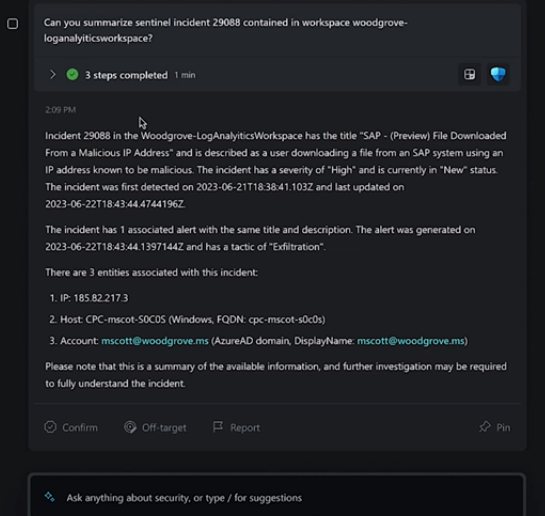
That’s where Microsoft Security Copilot comes in. Microsoft Security Copilot is a generative AI-powered security solution. It provides tailored insights that empower your team to defend your network. It works with other Microsoft security products. It also integrates with natural language to generate tailored guidance and insights.

In this article, we will explain what Microsoft Security Copilot is. We’ll explore its benefits and whether it’s the right choice to enhance your digital defenses.

What Is Microsoft Security Copilot?

Microsoft Security Copilot is a cutting-edge cybersecurity tool. It leverages the power of AI and machine learning for threat detection and response. Copilot aims to enhance the efficiency and effectiveness of cybersecurity operations.

Microsoft Security Copilot helps security teams:

  • Respond to cyber threats
  • Process signals
  • Assess risk exposure at machine speed

It works with other Microsoft security products as well. A big benefit is that it integrates with natural language. This means you can ask questions plainly to generate tailored guidance and insights.

Security Copilot can help with end-to-end scenarios such as:

  • Incident response
  • Threat hunting
  • Intelligence gathering
  • Posture management
  • Executive summaries on security investigations

How Does Microsoft Security Copilot Work?

You can access Microsoft Security Copilot capabilities through a standalone experience. As well as embedded experiences available in other Microsoft security products.

Copilot integrates with several tools, including:

  • Microsoft Sentinel
  • Microsoft Defender XDR
  • Microsoft Intune
  • Microsoft Defender Threat Intelligence
  • Microsoft Entra
  • Microsoft Purview
  • Microsoft Defender External Attack Surface Management
  • Microsoft Defender for Cloud

You can use natural language prompts with Security Copilot. This makes it easy to ask for information or guidance on various security topics.

For example, you can ask:

  • What are the best practices for securing Azure workloads?
  • What is the impact of CVE-2024-23905 on my organization?
  • Generate a report on the latest attack campaign.
  • How do I remediate an incident involving TrickBot malware?
Security Copilot
Image source: Microsoft

Should You Use Microsoft Security Copilot?

The Pros:

  1. Advanced Threat Detection
    Microsoft Security Copilot employs advanced algorithms. These detect and analyze threats that may go unnoticed by traditional security measures. It has the ability to adapt to new threats in real time. This enhances the security posture for organizations.
  1. Operational Efficiency
    Copilot automates threat analysis. This allows security teams to focus on strategic decision-making. It also reduces the time and effort spent on manual data analysis. The tool streamlines workflows, enabling quicker responses to potential threats.
  1. Integration with Microsoft Products
    Microsoft Security Copilot seamlessly integrates with several Microsoft products. This creates a comprehensive cybersecurity ecosystem. The synergy between these tools enhances threat visibility as well as response capabilities.
  1. Continuous Learning
    The AI and machine learning components of Copilot continuously learn from new data. This improves their ability to identify and mitigate emerging threats over time. This adaptive learning approach ensures that the tool evolves. Which is important to do alongside the ever-changing threat landscape.
  1. Reduced False Positives
    Copilot’s advanced algorithms contribute to a more accurate threat detection process. This minimizes false positives that can overwhelm security teams. The result is a more focused and efficient response to genuine threats.

The Considerations:

  1. Integration Challenges
    Microsoft Security Copilot seamlessly integrates with Microsoft and other security products. But organizations using a diverse range of cybersecurity tools may face integration challenges. Consider the compatibility of Copilot with your existing cybersecurity infrastructure.
  1. Resource Requirements
    The deployment of advanced AI and machine learning technologies may demand extra resources. Companies should check if their existing infrastructure supports the requirements of the tool.
  1. Training and Familiarization
    Successfully leveraging the benefits of Copilot requires training. As well as familiarization with the tool’s functionalities. Ensure that your security team is adequately trained. This will maximize the potential of this cybersecurity solution.

The Bottom Line

Microsoft Security Copilot represents a leap forward in the realm of AI-driven cybersecurity. It has an advanced capacity for real-time threat detection and operational efficiency. As well as extensive integration capabilities. These factors make it a compelling choice. Especially for businesses seeking to fortify their
digital defenses.

Your unique business needs should guide the decision to adopt Microsoft Security Copilot. Consider factors such as existing cybersecurity infrastructure and resource availability. As well as the commitment to ongoing training.

Get Expert Microsoft Product Support Here!

Microsoft is a vast ecosystem of interconnected business tools. Security Copilot is one of the newest to help you secure your online landscape. If you need some help leveraging these tools for your company, let us know. We are experienced Microsoft service providers. Our team can help you make the most of these tools.

Contact us today to schedule a consultation.

—
Featured Image Credit

This Article has been Republished with Permission from The Technology Press.

Filed Under: Microsoft

Smart Tactics to Reduce Cloud Waste at Your Business

April 25, 2024 by Nathan Parks

Cloud computing has revolutionized the way businesses operate. It offers scalability, flexibility, and cost-efficiency. But cloud services also come with a downside: cloud waste.

Cloud waste is the unnecessary spending of resources and money on cloud services. These services are often not fully utilized or optimized. About 32% of cloud spending is wasted. This can lead to budget concerns as spending
skyrockets.

But that figure also holds opportunity. It means that you can reduce nearly a third of cloud spending by optimizing how you use cloud tools.

So, how can you reduce cloud waste at your business and save money? Here are some smart tactics to consider.

Conduct a Comprehensive Cloud Audit

Before implementing any cost-cutting strategies, conduct an audit. It’s essential to have a clear understanding of your current cloud usage. Conducting a comprehensive cloud audit allows you to identify:

  • Underutilized resources
  • Overprovisioned instances
  • Unnecessary services

Use cloud management tools to generate reports. Look at usage patterns, costs, and performance metrics. This initial assessment forms the foundation for implementing effective waste reduction tactics.

Put in Place Right-Sizing Strategies

Right-sizing involves matching your cloud resources to the actual demands of your workloads. Many businesses fall into the trap of overprovisioning. This means securing more user licenses or features than they need. This leads to increased costs and unnecessary waste.

Analyze your workload requirements and resize instances accordingly. Use tools provided by your cloud service provider. These tools can identify and adjust the capacity of instances. This ensures that you only pay for the resources you truly need.

Use Reserved Instances and Savings Plans

Cloud providers offer cost-saving options like Reserved Instances (RIs) and Savings Plans. These allow businesses to commit to a specific amount of usage. This is in exchange for discounted rates. By leveraging these options, you can significantly reduce your cloud costs over time.

Carefully analyze your workload and usage patterns. Then, determine the most cost-effective reserved capacity or savings plan. Find a plan that aligns with your business’s long-term goals.

Install Automated Scaling Policies

Dynamic workloads have a need for dynamic resource allocation. Install automated scaling policies. These ensure that your infrastructure scales up or down based on demand. This optimizes performance. It also prevents overprovisioning during periods of low activity.

Cloud services enable you to set predefined policies for scaling. Examples are AWS Auto Scaling and Autoscale in Azure. These features help ensure efficient resource utilization without manual intervention.

Track and Optimize Storage

Storage costs can accumulate quickly. This is especially true when data is not regularly reviewed and archived. Estimate your storage needs. Then, put in place lifecycle policies to automatically downsize lesser-used data such as transitioning less frequently accessed data to lower-cost storage options.

Regularly review and delete unnecessary data to free up storage space. Adopt a proactive approach to storage management. This can help you significantly reduce costs associated with data storage.

Schedule Your Cloud Resources

Schedule your cloud resources to run only when you need them. For example, turn off development, testing, or staging environments during nights and weekends. Or scale down your production environment during off-peak hours.

Use available tools to automate the scheduling of your cloud resources. Base this on automated rules and policies that you define.

Delete Unused or Orphaned Cloud Resources

Sometimes, you may forget or neglect to delete cloud resources. Resources that you no longer need or use. This can include:

  • Snapshots
  • Backups
  • Volumes
  • Load balancers
  • IP addresses
  • Unused accounts

These resources can accumulate over time and incur unnecessary costs. To avoid this, you should regularly audit your cloud environment. Delete any unused or orphaned resources your business is not using. You can often use cloud provider tools to find and remove these.

Weed Out Duplicate Services

Different departments in the same organization may be using duplicate services. Marketing may use one task management app, while Sales uses a different one. Centralize cloud resources and remove duplicate tools.

Having everyone use the same cloud tool for the same function can save money as well as enhance collaboration, reporting, and data integration.

Embrace Serverless Architecture

Serverless computing allows businesses to run applications without managing the underlying infrastructure. You pay only for the actual compute resources used for your processes. This eliminates the need for provisioning and maintaining servers. Which reduces both operational complexity and costs. Consider migrating suitable workloads to a serverless model. This can help you optimize resource use and cut cloud waste.

Schedule a Cloud Optimization Assessment Today!

By following these smart tactics, you can reduce cloud waste at your business as well as optimize your cloud spending. This helps you save money. You can also improve operational efficiency and environmental sustainability.

Are you struggling with expanding cloud costs? Need help identifying and removing cloud waste? Our team of cloud experts can help you.

Contact us today to schedule your assessment.

—
Featured Image Credit

This Article has been Republished with Permission from The Technology Press.

Filed Under: Business

Eye-opening Insights from the 2023 Annual Cybersecurity Attitudes and Behaviors Report

April 20, 2024 by Nathan Parks

We are living in an era dominated by digital connectivity. You can’t overstate the importance of cybersecurity. As technology advances, so do the threats that lurk in the online world.

Often, it’s our own actions that leave us most at risk of a cyberattack or online scam. Risky behaviors include weak passwords and lax security policies. As well as thinking “This won’t happen to me.” This is why human error is the cause of approximately 88% of data breaches.

The National Cybersecurity Alliance and CybSafe are working to correct poor cyber hygiene. Each year, the duo publishes a report on cybersecurity attitudes and behaviors. The goal is to educate both people and businesses. To educate them on how to better secure their digital landscapes.

This year’s study surveyed over 6,000 people across the U.S., Canada, the U.K., Germany, France, and New Zealand. The survey asked about several things. These include knowledge of cybersecurity risks, security best practices, and challenges faced.

The report reveals some eye-opening insights. These include how people perceive and respond to cyber threats. As well as what they can do to improve their cybersecurity posture. Here are some of the key findings from the report.

We Are Online… a Lot

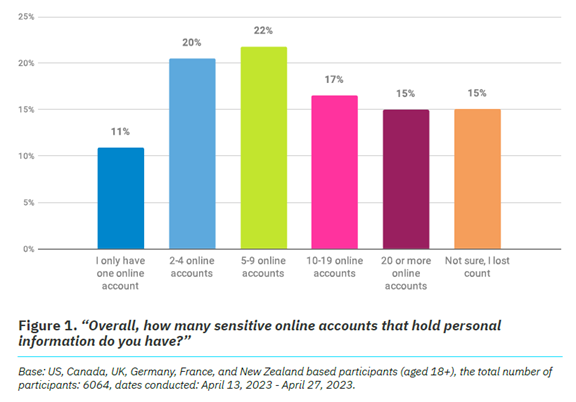
It’s no surprise that 93% of the study participants are online daily. The logins we create continue to expand, as well as those considered “sensitive.” Sensitive accounts hold personal information that could be harmful if stolen.

Nearly half (47%) of the study’s respondents have ten or more sensitive online accounts. This amplifies risk. Especially if people are using the same password for two or more of those accounts.

The Annual Cybersecurity Attitudes and Behaviors Report 2023
Source: The Annual Cybersecurity Attitudes and Behaviors Report 2023

Online Security Makes People Frustrated

Most people (84%) feel that online security is a priority. But as many as 39% feel frustrated, and nearly the same amount intimidated. It can seem that you just can’t get ahead of the hackers. Just over half of people thought digital security was under their control. That leaves a whole lot that don’t think so.

But that is no reason to let down your defenses and become an easy target. There are best practices you can put in place to safeguard your online accounts that work.

These include:

  • Enabling multi-factor authentication on your accounts
  • Using an email spam filter to catch phishing emails
  • Adding a DNS filter to block malicious websites
  • Using strong password best practices

People Need More Access to Cybersecurity Training

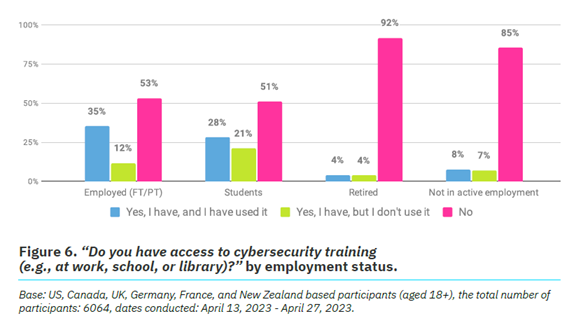
One way to reduce human errors associated with cybersecurity is to train people. The survey found that just 26% of respondents had access to cybersecurity training.

It also broke this down by employment status. We see that those not actively employed are most lacking. Even those employed can use more training access and encouragement. Just 53% report having access to cybersecurity awareness training and using it.

Source: The Annual Cybersecurity Attitudes and Behaviors Report 2023

Employers can significantly reduce their risk of falling victim to a data breach. They can do this by beefing up their security awareness training. There is also a large opportunity to provide more training. Particularly to those retired or not actively employed.

Cybercrime Reporting Is Increasing

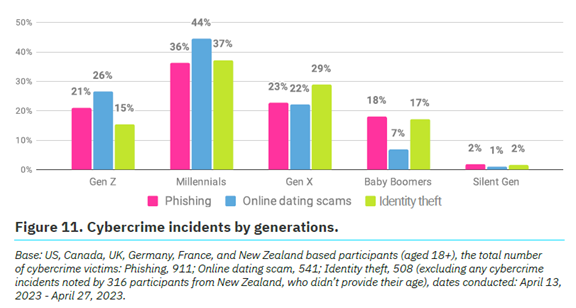
Over a quarter (27%) of survey participants said they had been a victim of cybercrime.

The types of cybercrimes reported include:

  • Phishing (47%)
  • Online dating scams (27%)
  • Identity theft (26%)

Which generation reported the most cybercrime incidents? Millennials. In fact, Baby Boomers and the Silent Generation reported the fewest.

Cybercrime incidents by generations
Source: The Annual Cybersecurity Attitudes and Behaviors Report 2023

No matter where you fall in the generations, it’s important to adopt security best
practices. We’ll go through some of these next.

Online Security Best Practices to Reduce Your Risk

  1. Strong, Unique Passwords:
    • Start with the basics. Create strong, unique passwords for each online account.
    • Use a combination of uppercase and lowercase letters, numbers, and special characters.
  2. Multi-Factor Authentication (MFA):
    • Enhance your account security with multi-factor authentication.
    • MFA adds an extra barrier to unauthorized access. Even for
      compromised passwords.
  3. Regular Software Updates:
    • Keep all your software, including operating systems and mobile
      apps, up to date.
  4. Beware of Phishing Attacks:
    • Exercise caution when clicking on links or opening attachments
      especially in emails from unknown sources.
    • Verify the legitimacy of emails and websites. Check for subtle
      signs, such as misspelled URLs or unfamiliar sender addresses.
  5. Use Secure Wi-Fi Networks:
    • Ensure you connect to a secure and password-protected Wi-Fi
      network.
    • Avoid using public Wi-Fi for sensitive transactions. Unless using a virtual private network (VPN).
  6. Data Backup:
    • Regularly back up important data to an external device or a secure
      cloud service.
  7. Use Antivirus and Anti-Malware Software:
    • Install reputable antivirus and anti-malware software on all devices.
    • Regularly scan your systems for potential threats.
  8. Be Mindful of Social Media Settings:
    • Review and adjust your privacy settings on social media platforms.
    • Limit the amount of personal information visible to the public.
  9. Secure Your Personal Devices:
    • Lock your devices with strong passwords or biometric
      authentication.
  10. Educate and Stay Informed:
    • Educate yourself and your team through cybersecurity awareness
      programs. This fosters a culture of vigilance and preparedness.

Schedule Cybersecurity Awareness Training Today

A little education on cybersecurity goes a long way toward protecting your data. Our experts can provide security training at the level you need. We’ll help you fortify your defenses against phishing, scams, and cyberattacks.

Contact us today to schedule a chat.

—
Featured Image Credit

This Article has been Republished with Permission from The Technology Press.

Filed Under: Cybersecurity

  • « Previous Page
  • 1
  • …
  • 7
  • 8
  • 9
  • 10
  • 11
  • …
  • 17
  • Next Page »

Call Us
Toll Free – 844.300.9990

Ashland, KY – 606.325.9990

Ironton, OH – 740.414.4419

Huntington, WV – 304.521.1579

Fax – 606.393.6114

Business Hours

Phone Support – 8am-5pm Monday through Friday 
Shop Hours – 9am-5pm Monday through Friday 

* Closed for Company Meeting
Wednesday Afternoon 12-1 – Please Call *
 
Emergency Services Available
support@HighPCS.com


Directions

824 Greenup Ave.
PO Box 2112
Ashland, KY 41101

NinjaCopyright © 2026 · Agency Pro Theme on Genesis Framework · WordPress · Log in